Covenant Desk Lending · Hong Kong
The operating system for Hong Kong private lenders.
Run applications, eKYC, AML, scoring, approvals, loans, billing, payments and collections in one connected workspace—with CRM, BI, APIs, bots and AI assistance.
From HK$1,500/month · English and Traditional Chinese · Web-based
Complete lending lifecycle
Four operating surfaces, connected by one borrower record.
Replace hand-offs between forms, spreadsheets, inboxes and disconnected tools with a traceable journey that staff can review from application to final repayment.
Applications, documents, eKYC and AML
Capture web, email, WhatsApp and staff-entered applications. Keep HKID data, liveness results, iAM Smart confirmation, watchlist screening, consent and evidence on the applicant record.
Review identity controlsRules, scoring, human approval and e-signature
Apply lender-configured eligibility, affordability and exposure policies, route exceptions to named authorities, generate approved documents and retain the signed copy with its audit trail.
Review decision controlsLoans, billing, payments and collections
Operate repayment schedules, FPS payment journeys, notices, matching queues, promises to pay, overdue follow-up and borrower self-service without losing the source record.
Review repayment operationsCRM, Customer 360, BI, APIs and AI
Give management and authorised teams one operational view, with portfolio reporting, role-based access, source-system sync, auditable AI assistance and export-ready data.
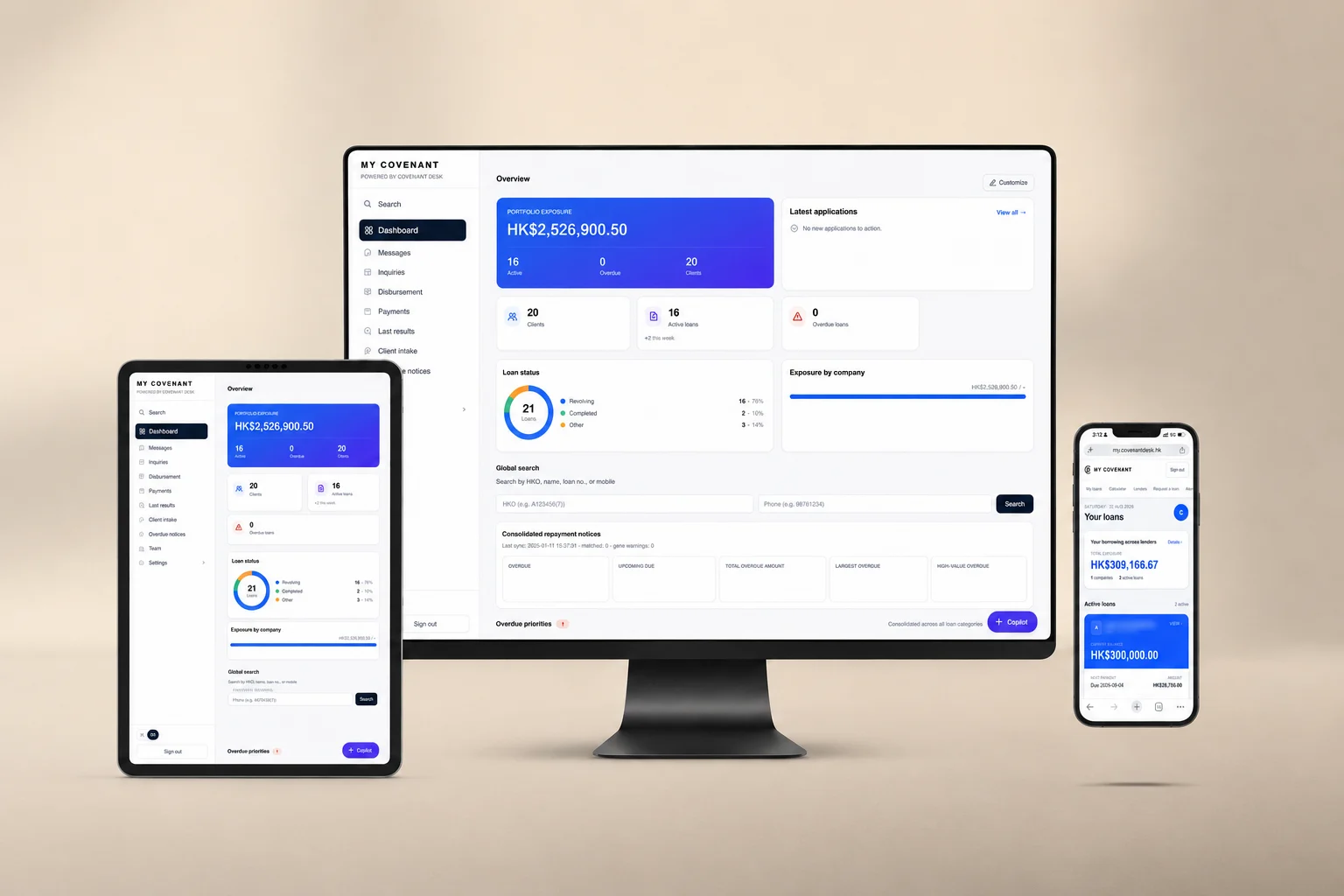
Review the management portal
What it does
A working portal around the lender's real borrower records.
Covenant Desk Lending is designed for Hong Kong licensed money lenders that need one place to review borrowers, coordinate intake, service repayments, and oversee staff activity across one or more companies. It holds its own borrower database. Records from an existing system such as Softmedia import into it, so a lender can move across in stages rather than cutting over in one step.
Platform map
From source systems to daily lender workflows.
The product keeps the lender's source of truth visible while giving staff a more usable operating layer for review, follow-up, and oversight.
Source systems
Softmedia sync, Excel import, email intake, WhatsApp intake, and staff manual entry.
Unified records
CustomerRecord, Loan, SoftmediaNotice, InboundLead, RepaymentIntent, messages, audit, and user permissions.
Staff workflows
Dashboard, search results, Customer 360, overdue feed, intake queue, messages, payments, admin.
Borrower self-service
Client dashboard, loan detail, FPS QR, autopay readiness, request status, statements, account controls.
Review and reporting
AI summaries, Copilot database tools, management exports, sync health, audit trail, CDS-ready records.
Modules
22 implemented modules. Open only the detail you need.
This directory records the exact job, users and boundaries of every module. The four core control workflows also link to full implementation guides. Covenant Desk assists staff; the lender keeps its policies, authorities and final decisions.
- Management Portal
- Customer 360
- Loan Intake
- Identity Verification (eKYC)
- AML Screening
- Decision Rules Engine
- Human Review Workflow
- Repayment Operations
- Outbound Communications
- Borrower App
- AI Review Layer
- Document Extraction
- Document Templates & e-Signature
- Management Copilot
- Multi-company Federation
- Portfolio Oversight
- Audit Trail
- Role-based Access Control
- Source-system Sync
- Phased Migration
- CDS Readiness Assessment
- CDS-ready Data Preparation
Management Portal
The permission-scoped workspace lending staff work in: one shared portal, one borrower database and one audit trail across every connected lending company.
Capabilities, users and limits
Customer 360
One borrower record that joins applications, approved terms, documents, repayments, communications and related-company exposure in a single view.
Capabilities, users and limits
Loan Intake
Web, email, WhatsApp and staff-entered applications land in one assignable queue with channel, timestamp and required-document status preserved.
Capabilities, users and limits
Implemented end to end
Identity Verification (eKYC)
Borrower identity is captured and checked during intake — HKID document capture, liveness check and iAM Smart — so staff open a verified applicant record instead of a photocopy.
Capabilities, users and limits
Implemented end to end
AML Screening
Applicants and existing borrowers are screened against PEP, sanctions and watchlist sources, with potential matches queued for a named staff member to clear or escalate.
Capabilities, users and limits
Implemented end to end
Decision Rules Engine
Credit policy the lender's own risk team configures — eligibility rules, scorecards and routing thresholds — applied the same way to every application before a human reviewer opens it.
Capabilities, users and limits
Human Review Workflow
Approval authority, exception reasons, escalation levels and the final human decision are recorded against every application.
Capabilities, users and limits
Repayment Operations
Schedules, instalments, consolidated repayment notices, arrears queues, reconciliation and settlement handled in one place after disbursement.
Capabilities, users and limits
Outbound Communications
SMS, WhatsApp, email and in-app push sent from the borrower record itself, with templates, scheduling and per-message delivery status written back against the loan.
Capabilities, users and limits
Borrower App
A borrower-facing surface for balances, repayment schedules, notices and document submission, scoped to what the lender chooses to expose.
Capabilities, users and limits
AI Review Layer
Decision-support that summarises an application file, highlights inconsistencies and drafts review notes for a named member of staff to accept, edit or reject.
Capabilities, users and limits
Document Extraction
Reads supplied application documents into structured fields so staff correct and confirm values instead of retyping them.
Capabilities, users and limits
Implemented end to end
Document Templates & e-Signature
Lender-authored agreement, addendum and notice templates that merge borrower and loan fields, are issued for online signature, and file back against the loan with a timestamped audit record.
Capabilities, users and limits
Management Copilot
Answers operating questions about the lender's own portfolio in plain language, with links back to the underlying records.
Capabilities, users and limits
Multi-company Federation
Several lending companies operate from one login with separate books, separate permissions and a group-level view for owners.
Capabilities, users and limits
Portfolio Oversight
Balances, arrears, ageing, exception volumes and operating throughput reported across one company or the whole group.
Capabilities, users and limits
Audit Trail
Who viewed, changed, approved or exported a borrower record, when, and under which company scope.
Capabilities, users and limits
Role-based Access Control
Roles decide who can see full identity data, who can approve, who can export and which companies each member of staff can reach.
Capabilities, users and limits
Source-system Sync
Mapped, agreed data flows between an existing loan ledger or spreadsheet set and the Covenant Desk borrower record.
Capabilities, users and limits
Phased Migration
Move a lender onto Covenant Desk in stages. Records held in an existing system such as Softmedia or TE Credit, or in spreadsheets, are imported into the Covenant Desk database, and the two can run side by side during rollout so nothing has to cut over in a single step.
Capabilities, users and limits
CDS Readiness Assessment
A free bilingual 15-point operating self-assessment that scores a lender's data, permission and workflow readiness and returns priority actions.
Capabilities, users and limits
CDS-ready Data Preparation
Structures application, approved-term and repayment records so a lender's own credit-data workflow starts from complete, consistent, exportable data.
Capabilities, users and limits
The same modules, with the pages each one relates to and a Traditional Chinese description, are on the Covenant Desk product map.
Plans
Two plans, split by how many lending companies you run.
Pick the scope, then confirm users, source systems and enabled workflows during implementation. AI, bots and the other add-ons are priced separately on top of either plan.
No setup fee. Configure modules and implementation scope before launch.
Configure Single companyHK$5,000 one-time setup. Configure modules and implementation scope before launch.
Configure Cross-companyBeyond three lending companies, or above those seat and record counts, the enterprise scope (Federation, HK$14,000/month plus HK$20,000 setup) is quoted on a call. Book a demo
Paid deployment since 3 August 2026

Paid Covenant Desk Lending deployment with ongoing monthly maintenance.
One authorised borrower view across connected companies.
Grand Finance needed one authorised borrower view across multiple connected companies so staff could compare client profiles and identify potential cross-company loan exposure before making a lending decision.
Implemented result: Grand Finance has a consolidated operating view for reviewing potential duplicate or overlapping borrowing across its connected companies, supporting more informed human risk review without automating the lending decision.
Product boundaries
Software layer, not lender decisioning.
Covenant Desk Lending is lending operations software made by Covenant Desk. It does not provide loans, hold funds, sign loan agreements, set final terms, or make credit decisions. Participating lenders provide actual terms and make all lending decisions under their own policies.
- 01Human review - AI outputs are decision-support tools and must be reviewed by authorized staff.
- 02Scoped data - borrower and company records are scoped by role, company, permission, consent, and audit controls.
- 03Existing systems - records import from whatever the lender runs today into Covenant Desk's own database; it does not run on top of another system.
Every module is listed with its capabilities and its limits above and on the Covenant Desk product map. For how the product sits against a CRA, Credit Data Smart, an LOS and an LMS, see What is Covenant Desk?